For many, the Slack web app is merely a browser-based communication tool. For technical leaders, however, it represents something more fundamental: a strategic component for building a centralized operational hub. Viewing it through an architectural lens reveals its potential to unify disparate systems and streamline complex workflows.
This guide is not about adding another tool to your stack. It is about making a deliberate architectural decision to leverage the Slack platform as a control plane for critical business processes, impacting scalability, security, and operational velocity.
The Problem: Tool Fragmentation vs. Integrated Operations
The primary challenge in modern IT environments is not a scarcity of tools but their fragmentation. Disconnected software stacks and inefficient data flows create friction, slow down response times, and introduce operational risk. The objective is to move from a collection of siloed applications to an integrated ecosystem.
Using the Slack web app as a central integration point offers distinct architectural advantages:
- Zero-Installation Deployment: Custom workflows and tools become accessible through any standard web browser, eliminating the overhead of software distribution, client-side updates, and complex onboarding for internal teams, contractors, or partners.
- Centralised Interaction Models: By embedding integrations within the Slack user interface, you standardize how teams interact with diverse systems—from CI/CD pipelines to CRM platforms and internal support queues. This enforces consistency and reduces cognitive load.
- Enhanced Security Posture: The browser’s native sandboxing provides a layer of isolation between the web app and the host operating system. When combined with Slack’s authentication and permission models, this allows for fine-grained control over data access and user actions.
The paradigm shift occurs when Slack is no longer treated as a passive destination for notifications but as an interactive control plane. The work should happen where the technical conversation happens.
This leads to a critical decision point: leveraging off-the-shelf applications from the marketplace versus architecting and building custom integrations. Pre-built apps are effective for common, generic use cases. However, for proprietary systems, complex business logic, or stringent data governance and compliance requirements, a custom solution is a strategic necessity. This guide provides the technical foundation for making that architectural decision.
Client Strategy: Web App vs. Desktop vs. Mobile
The choice between Slack’s web, desktop, and mobile clients is an architectural decision with direct implications for security, deployment, and the operational effectiveness of custom integrations. Each client presents a different set of trade-offs that a technical leader must evaluate.
An Architectural Breakdown of Each Client
The Slack web app operates within the browser’s security sandbox, which isolates it from the local operating system. This is a significant security benefit, particularly in environments with strict endpoint security policies or when granting access to external users.
Its primary advantage is zero-installation access. Any authorized user can access complex workflows from any machine with a browser, which drastically simplifies deployment and reduces IT support overhead.
The native desktop app is often preferred by developers and power users for its performance characteristics. By utilizing dedicated system resources instead of competing with browser tabs, it offers lower latency and a more responsive user experience during intensive use. It also provides deeper OS-level integrations, such as more reliable native notifications and global keyboard shortcuts.
The mobile app is designed for asynchronous operations and on-the-go actions. Its utility lies in handling time-sensitive tasks like approving a deployment, receiving a critical alert, or providing a quick status update. It is not architected for complex administrative tasks or deep, interactive workflows; attempting to use it as such introduces unnecessary friction.
A Comparative Analysis for Technical Stakeholders
This table outlines the key architectural and operational differences between the clients.
Slack Client Comparison for Technical Teams
| Criterion | Web App | Desktop App | Mobile App |
|---|---|---|---|
| Deployment Model | Zero-install, browser-based | Managed installation and updates | App store distribution |
| Security Boundary | High (browser sandbox isolation) | Moderate (direct system access) | High (OS-level sandboxing) |
| Performance Profile | Good, but shares browser resources | Excellent, dedicated resources | Optimized for mobile constraints |
| Notification Reliability | Browser-dependent | OS-native, reliable | OS-native, push-based |
| Primary Use Case | External users, BYOD environments | Developers, DevOps, support teams | On-call staff, field teams, managers |
| Integration Context | Running defined workflows | Intensive interaction, development | Approvals, alerts, status actions |
This comparison highlights that the clients are tools for different jobs, not competitors for a single “best” title.
The Build vs. Buy Decision Framework
Before selecting a client, you must determine whether a custom integration is necessary.
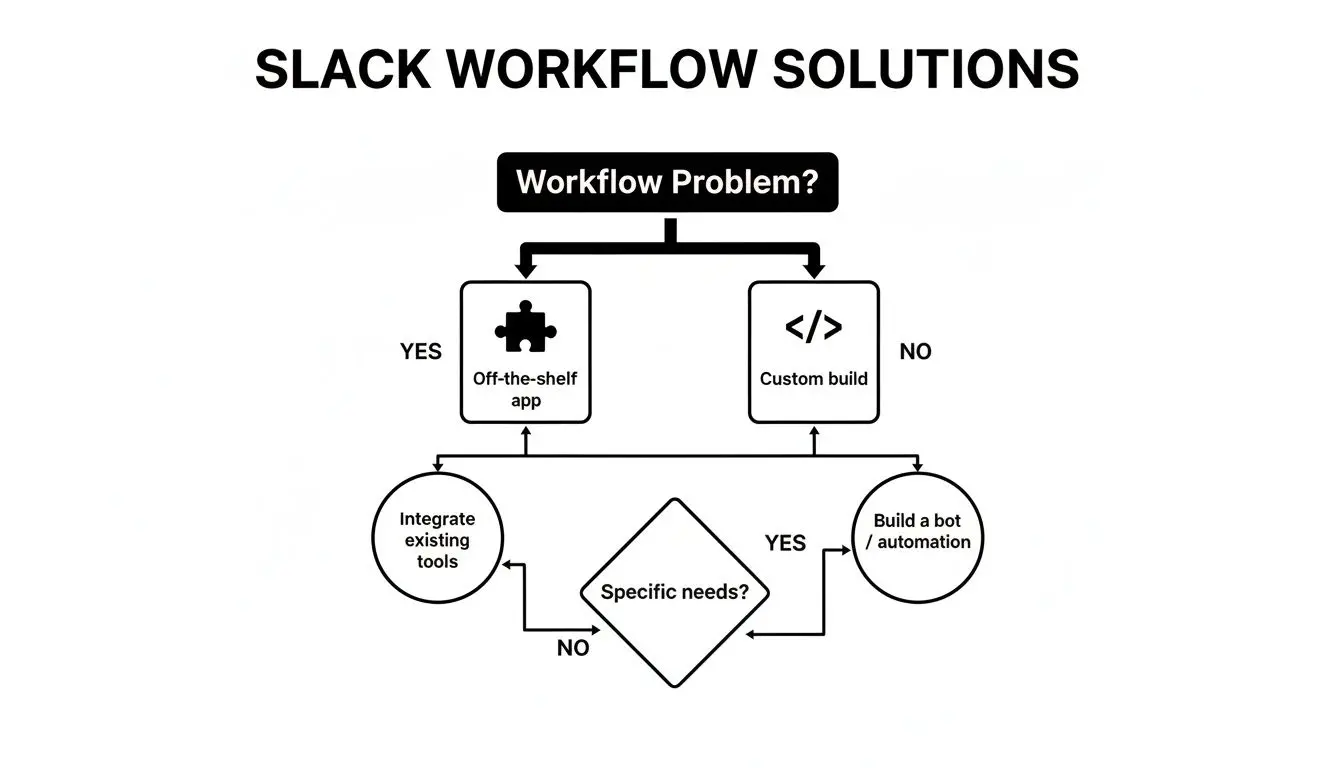
The decision path moves from identifying a workflow inefficiency to selecting an off-the-shelf app for a standardized problem or opting for a custom build to address unique business logic or integrate with proprietary systems.
An effective strategy often involves a hybrid approach: defining which client is appropriate for specific user personas and their corresponding security profiles. The web app’s accessibility makes it ideal for broad, low-risk deployments, while the desktop app serves power users who require higher performance.
This client strategy intersects with broader infrastructure decisions, sharing parallels with the considerations discussed in our analysis of on-premises vs cloud architectures. A well-defined strategy ensures that custom Slack applications enhance productivity without introducing new security vulnerabilities.
Core Architectural Patterns for Slack Integrations
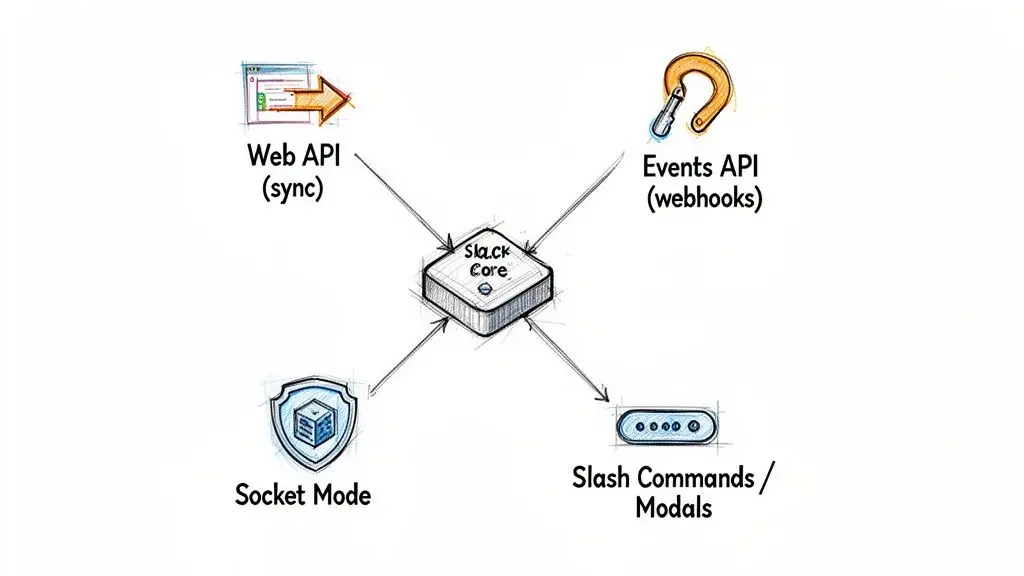
To build a robust Slack integration, you must first decide how it will communicate with the Slack platform. This is a fundamental architectural choice that dictates the application’s responsiveness, security posture, and infrastructure requirements. An incorrect choice at this stage can lead to a brittle, insecure, or unscalable application.
With over 650,000 custom apps built by organizations for internal use, the platform has become a de facto hub for technical and business operations. You can review more Slack usage statistics on sqmagazine.co.uk. To build an integration that provides real value, mastering Slack’s core communication patterns is essential.
The Web API: For Imperative, Application-Initiated Actions
The Slack Web API follows a standard request-response model. It serves as your application’s remote control for a Slack workspace. When your system needs to perform an action—such as posting a message, creating a channel, or looking up user information—it sends an authenticated HTTP request to a specific Web API endpoint. The interaction is synchronous: your application calls Slack and waits for a response.
This pattern is ideal for tasks initiated by your own systems. For example, a CI/CD pipeline script would call the chat.postMessage method to announce a deployment status to a #releases channel.
- Model: Request-Response (Synchronous)
- Use Case: Sending notifications, creating resources, or fetching data on demand.
- Constraint: The application initiates the interaction. It cannot react to events occurring within Slack.
The Events API: For Reactive, Event-Driven Workflows
The Events API inverts the communication model. Instead of your app calling Slack, Slack calls your app. You subscribe to specific event types (e.g., message.channels, reaction_added) and provide Slack with a publicly accessible Request URL (a webhook). When a subscribed event occurs, Slack sends a JSON payload to your endpoint. This enables an asynchronous, event-driven architecture.
This pattern is the foundation for any application that must react to user activity in real-time, such as conversational bots, channel monitoring tools, or automated workflow triggers. The principles are similar to those in modern service-oriented architecture, where services communicate via asynchronous events.
The primary trade-off involves infrastructure and security. You must expose a public HTTPS endpoint, which becomes part of your attack surface. It is critical to verify the cryptographic signature of every incoming request to ensure it originated from Slack. Failure to do so creates a significant security vulnerability.
Socket Mode: A Secure Alternative for Private Networks
For organizations with strict firewall policies or a “privacy by design” mandate, exposing a public endpoint is often not feasible. Socket Mode provides a secure alternative. Instead of receiving inbound HTTP requests, your application establishes a persistent, outbound WebSocket connection to Slack’s servers. All events and interactive payloads are then delivered over this secure tunnel.
This architecture eliminates the need for a public IP address, DNS management, and complex ingress firewall rules, representing a significant security improvement. Socket Mode is the pragmatic choice for developing and running integrations within a private network without sacrificing the real-time capabilities of the Events API.
- Benefit: No public endpoint required, providing a more secure-by-default posture.
- Trade-off: The application must manage the state of a persistent connection, which introduces slightly more complexity than stateless webhooks.
Selecting the appropriate pattern based on your application’s requirements and your organization’s security posture is the first step toward building a resilient and secure integration.
Implementing Ironclad Security and Authentication
An insecure Slack integration is not a minor bug; it is a potential gateway into your organization’s internal communications and connected systems. The risks range from unauthorized data exfiltration to an attacker triggering privileged actions, such as deploying code or modifying infrastructure. Security cannot be an afterthought; it must be an architectural prerequisite.
This begins with a rigorous implementation of Slack’s OAuth 2.0 flow, guided by the principle of least privilege.
When requesting permissions (scopes) for your application, be surgical. If an application only needs to post messages to a specific channel, do not request scopes that grant it the ability to read all public channels. Over-scoping is a common mistake that dramatically expands the blast radius should a token be compromised.
Secure Token Management and Rotation
Once an OAuth token is obtained, its protection is paramount. Hardcoding tokens into source code is an unacceptable practice that guarantees leakage into version control systems.
All secrets, including bot and user tokens, must be stored in a dedicated, encrypted secrets management service. Tools such as AWS Secrets Manager, Google Secret Manager, or HashiCorp Vault provide audited, programmatic access to secrets with robust encryption at rest.
A clear policy for token rotation and revocation is also necessary. Tokens should have a defined lifecycle. Your application must handle expired tokens gracefully by initiating a re-authentication flow. Furthermore, administrators must have a mechanism to revoke an application’s access immediately in response to a suspected security incident.
Request signature verification is not an optional feature; it is a mandatory security control. Disabling it for development convenience and forgetting to re-enable it in production is a common path to creating a critical vulnerability.
Verifying All Incoming Requests from Slack
Every request that Slack sends to your application—whether from the Events API, a slash command, or an interactive component—includes an X-Slack-Signature HTTP header. Your application must verify this signature on every incoming payload.
The verification process is as follows:
- Extract the raw request body and the
X-Slack-Request-Timestampheader. - Construct a basestring by concatenating the Slack API version number, the timestamp, and the raw request body, separated by colons.
- Compute an HMAC-SHA256 hash of the basestring using your app’s unique Signing Secret.
- Compare your computed hash with the
X-Slack-Signaturefrom the header.
If the signatures do not match, the request must be discarded immediately with a 403 Forbidden response. This procedure proves both the authenticity (the request is from Slack) and the integrity (the request was not tampered with in transit). Bypassing this step exposes your endpoint to replay attacks and request forgery. For deeper insights into building resilient systems, consider engaging with expert cyber security consultancies.
Real-World Use Cases for Custom Slack Integrations
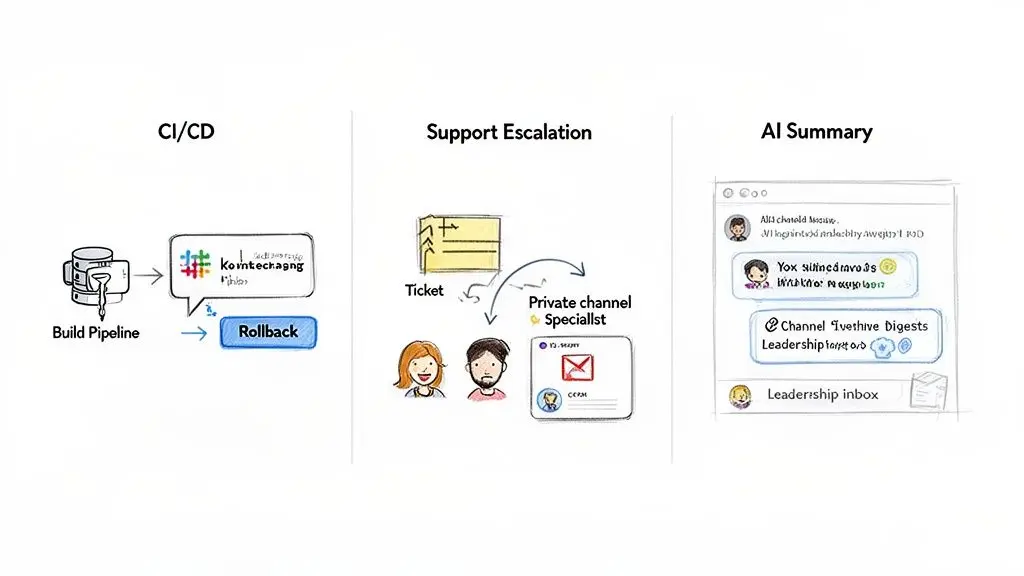
Architectural theory is valuable only when it solves a concrete business problem. The true measure of a custom integration lies in its ability to streamline workflows, reduce operational friction, and mitigate risk.
These practical examples demonstrate how a well-architected slack web app integration can transform from a communication tool into an interactive control plane for mission-critical operations.
Automating CI/CD Pipelines and Incident Response
A common DevOps challenge is the information silo created by CI/CD systems. Deployment status is often hidden within logs, and initiating a rollback requires an engineer to context-switch, log into a separate platform, and perform manual actions. During an incident, these delays directly impact recovery time.
A custom integration centralizes this entire workflow within a dedicated #devops or #releases channel.
- Problem: Disconnected deployment tooling slows down incident response and reduces situational awareness for the broader engineering team.
- Solution: A custom application subscribes to webhooks from the CI/CD server (e.g., Jenkins, GitLab CI). Upon receiving an event, it uses the Web API to post a structured message detailing the build status, committer, and deployed service.
- Architecture: The message is interactive. In the event of a failed deployment, an authorized engineer can click a “Rollback” button directly within Slack. This action sends a verified payload to the integration’s backend, which authenticates the user and executes the rollback via an API call to the CI/CD platform.
The business outcome is a measurable reduction in Mean Time to Recovery (MTTR). A multi-step, manual process becomes a single, auditable click within the same environment where the incident response is being coordinated.
Intelligent Customer Support Escalation
High-priority support tickets are often delayed in a general queue, awaiting manual triage and assignment. By the time the issue reaches a subject-matter expert, the customer is frustrated, and valuable time has been lost to procedural overhead.
An escalation bot can automate this triage and assignment process.
- Problem: Manual ticket escalation is slow, prone to human error, and results in a poor customer experience.
- Solution: A support agent identifies a critical issue in a channel and reacts with a designated emoji (e.g., 🚨). The integration, listening via the Events API, detects this
reaction_addedevent. - Architecture: The bot fetches customer data from a CRM like Salesforce via its API. It then creates a dedicated, private channel (e.g.,
incident-acme-2023-123), inviting the original agent, a pre-defined Tier-2 lead, and the relevant account manager. A summary of the issue and customer context is posted, immediately aligning all stakeholders.
AI-Powered Summarization of Decisions and Action Items
Critical decisions and action items become buried in the high volume of daily messages. Manually parsing channels to extract these key points is an unscalable task for project managers and leadership.
This is an ideal application for an AI-powered agent. For the 77 of the Fortune 100 companies using Slack, extracting signal from this conversational noise is a significant priority. More data is available on the widespread corporate adoption of Slack at ElectroIQ.
- Problem: Important decisions and action items are lost in channel noise, leading to misalignment, missed deadlines, and a lack of accountability.
- Solution: A custom bot ingests messages from key project channels via the Events API. This content is processed by a Large Language Model (LLM) to identify and summarize action items, key decisions, and open questions.
- Architecture: The bot posts a concise, formatted digest to a private
#project-summaryor#leadership-updateschannel at a regular interval. This provides managers with a scannable overview of project velocity and blockers, converting unstructured conversational data into structured, actionable intelligence.
Conclusion: Key Takeaways for Technical Leaders
The most significant mistake a CTO or product leader can make is to view Slack as just a chat application. Its real value is unlocked when the slack web app is treated as an extensible, interactive control plane for the entire business. This shift in perspective enables the architecture of an automated, integrated operational backbone, where custom integrations become a source of competitive advantage.
Choosing the right architectural pattern—Web API, Events API, or Socket Mode—is a foundational decision. This choice dictates how your integration performs, scales, and adheres to your organization’s security and infrastructure policies.
Security is not a feature to be added later; it is an architectural commitment from day one.
Implementing robust security through principles like least-privilege OAuth scopes and mandatory request signature verification is non-negotiable. These are the minimum controls required to protect your organization from significant and demonstrable risks.
Ultimately, the objective is to strategically leverage custom Slack integrations to dissolve workflow silos and create a more connected, efficient organization. The architectural choices made in this domain have a direct and measurable impact on business outcomes, from reducing incident response times to improving developer productivity.
Frequently Asked Questions
These are common questions that arise during the planning and development of Slack integrations, with answers aimed at informing architectural decisions.
When Should I Build a Custom Slack App vs. Use a Marketplace App?
Use a marketplace app when your requirement is a commodity solved by a standard workflow. Examples include GitHub notifications, Google Calendar alerts, or integration with other widely used SaaS products. These off-the-shelf tools are quick to deploy and address a known problem.
You must build a custom app when you need to integrate with proprietary internal systems, orchestrate a business process unique to your organization, or enforce specific data handling and compliance rules. A custom app provides complete control over the user experience, data flow, and security model, which is non-negotiable for mission-critical functions.
What Is the Most Critical Security Mistake to Avoid?
The single most catastrophic mistake is failing to validate request signatures. If your application’s endpoints do not cryptographically verify that incoming requests originate from Slack, they are vulnerable to forgery. An attacker can send fabricated requests to inject malicious data, trigger unauthorized actions, and potentially compromise connected systems.
Treat signature verification as a mandatory, non-negotiable security control for any internet-facing endpoint. A close second is poor token hygiene, such as hardcoding secrets in source code or requesting overly permissive OAuth scopes.
How Should My Application Handle API Rate Limits?
Design for rate limits proactively, do not just react to them. The correct implementation involves a client-side request queue that uses an exponential backoff with jitter algorithm.
When your application receives a 429 Too Many Requests response, it should not fail. It should pause for a small, randomized interval and retry the request. If it fails again, the delay should increase exponentially. Always respect the Retry-After header if Slack provides it. For high-volume applications, batching API calls (e.g., sending one message with multiple attachments instead of multiple messages) is an effective strategy for staying within limits and building a resilient system.
Building reliable, secure, and maintainable software is an architectural choice. Devisia specialises in turning your vision into robust digital products and AI-enabled systems with a focus on long-term value. Learn how we can help you build your next integration.