A CI/CD pipeline is the automated process that moves software from a developer’s commit through build, test, and deployment stages into a production environment. It acts as a central control plane for software delivery, enforcing quality and consistency while eliminating the risks inherent in manual intervention. For any organization building or operating real software systems, a robust pipeline is not a luxury—it is a foundational requirement for predictable, high-quality releases.
The Problem: Why Manual Delivery is Untenable
In a competitive market, the velocity and reliability of software delivery are direct drivers of business outcomes. Manual deployment processes introduce significant friction, leading to unacceptable delays and a high probability of human error. Each manual step—compiling code, executing tests, configuring environments, or deploying artifacts—becomes a potential point of failure.
This friction creates systemic problems:
- Unpredictable Release Cycles: Manual processes are inherently inconsistent, making it difficult to forecast when new features will reach users.
- Increased Risk: “Big bang” deployments, which bundle numerous changes, amplify the risk associated with each release. A single error can cause significant downtime and require complex, stressful rollbacks.
- Delayed Feedback: Developers may not discover that their changes have broken the system until days or weeks after the initial commit, making debugging costly and inefficient.
- Innovation Drag: When deployments are perceived as high-risk events, teams become hesitant to release frequently. This caution stifles innovation and widens the gap between product development and market needs.
For organizations operating in regulated industries or managing complex AI systems, the consequences of a failed deployment extend beyond technical issues, impacting customer trust, regulatory compliance (e.g., GDPR, DORA), and financial stability.
The Solution: A Strategic Shift to Automation
A CI/CD pipeline addresses these problems by transforming software delivery from a high-risk, manual event into a low-risk, automated workflow. By systematically automating the build, test, and deployment stages, it establishes a consistent, repeatable, and auditable path from source code to production.
This architectural choice provides critical advantages:
- Accelerated Feedback Loops: The pipeline provides immediate feedback. If a commit introduces a regression or fails a security scan, the developer is notified within minutes, not days.
- Incremental, Low-Risk Delivery: Automation enables teams to release small, incremental changes. This practice drastically reduces the “blast radius” of potential failures and simplifies troubleshooting.
- Enhanced Reliability and Compliance: Automation eliminates configuration drift and inconsistent manual procedures. Every deployment adheres to the same validated process, ensuring reliability and providing a clear audit trail for compliance purposes.
Market data underscores this strategic shift. The continuous integration tools market was valued at $1.73 billion in 2025 and is projected to hit $4.53 billion by 2030. This is not a superficial trend; it is a clear indicator that organizations are investing in automation as a core capability. Mature teams are shipping software 60-80% faster than those still relying on manual processes. You can find more data on CI/CD tool adoption at TechnologyMatch.com.
A CI/CD pipeline is not merely a set of tools; it is a strategic asset. It enables a business to respond to market changes with agility, innovate with confidence, and build resilient systems that support long-term operational stability.
Deconstructing a Production-Ready CI/CD Pipeline
A production-ready CI/CD pipeline is more than a sequence of scripts; it is an automated assembly line designed to transform source code commits into validated, production-grade releases. Each stage functions as a quality gate, ensuring that only reliable code proceeds to the next step.
This infographic illustrates the contrast between the slow, error-prone nature of manual delivery and the predictable, high-velocity output of a well-architected automated pipeline.
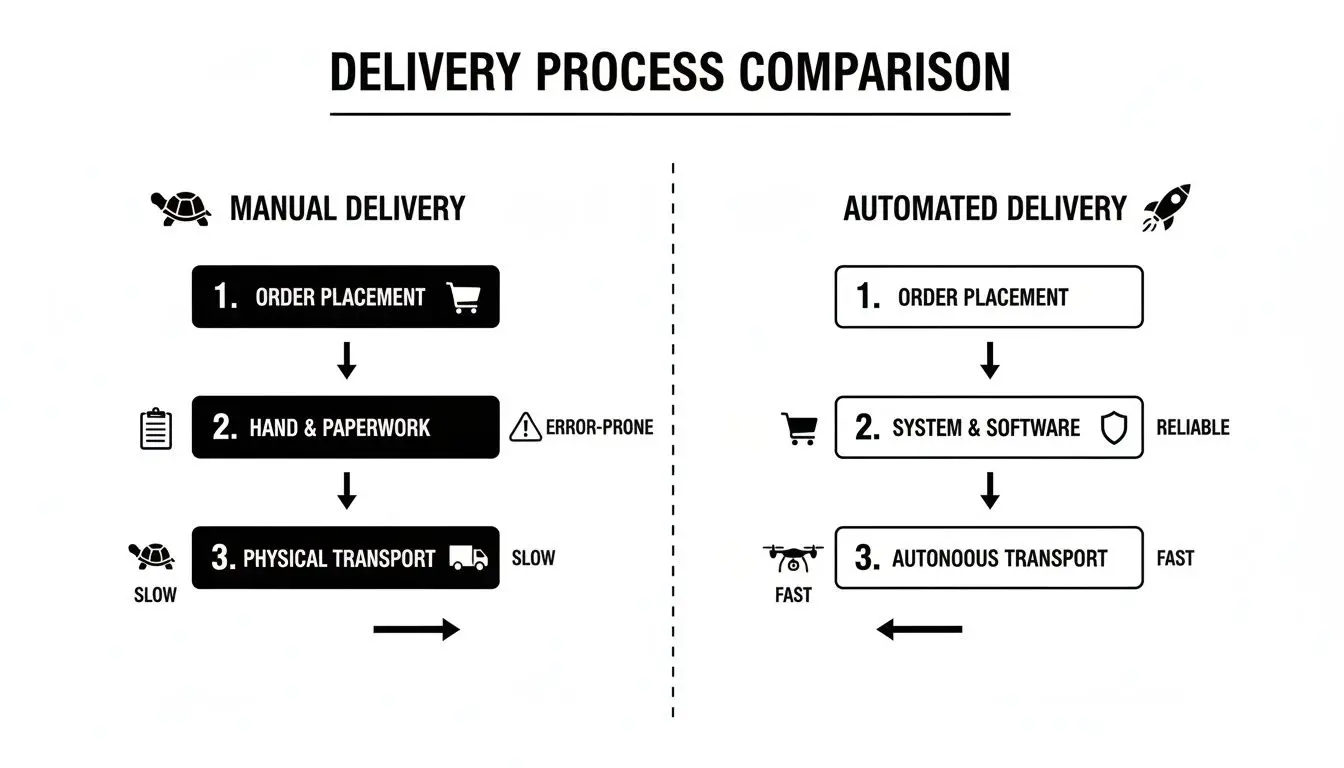
The core principle is the replacement of inconsistent human actions with deterministic, automated processes. This directly improves both delivery speed and software quality. To implement such a system, we must first understand its constituent stages.
Key Stages of a CI/CD Pipeline and Their Core Functions
The following table outlines the primary stages of a typical pipeline. Each stage builds upon the previous one, methodically moving code from commit to production through a series of automated quality checks.
| Stage | Primary Objective | Common Activities | Implementation Considerations |
|---|---|---|---|
| Source | Trigger the pipeline and enforce code quality at the entry point. | Committing code to a Git repository, webhook triggers, mandatory code reviews, protected branches. | Establishes a single source of truth and prevents unvetted code from entering the main development branch. |
| Build | Compile source code into a runnable, self-contained package (artifact). | Compiling code, running linters, dependency resolution, creating a Docker container image. | Creates a consistent and portable artifact that behaves identically across all environments. |
| Test | Automatically validate the artifact for correctness, performance, and security. | Running unit, integration, and end-to-end tests; static analysis (SAST); dependency vulnerability scanning. | Catches defects early, reduces manual QA overhead, and builds confidence in the release candidate. |
| Deploy | Release the validated artifact to one or more environments. | Pushing the artifact to staging or production using strategies like blue-green, canary, or rolling deployments. | Enables rapid delivery of new features to users with minimal risk and allows for controlled feedback collection. |
A failure at any stage halts the process and provides immediate feedback to the development team, ensuring issues are addressed before they reach users.
The Source Stage: The Single Point of Entry
The entire pipeline is triggered when a developer commits code to a version control system (VCS) like Git. The VCS is not merely a storage mechanism; it is the auditable, authoritative source of truth for the entire system.
At this stage, process integrity is paramount. Enforcing practices like protected branches and mandatory peer reviews serves as the first line of defense, ensuring that code quality standards are met before automation even begins. This is quality control applied at the source.
The Build Stage: From Code to Artifact
Upon a successful commit to a designated branch, the Continuous Integration (CI) server (e.g., Jenkins, GitLab CI) retrieves the latest source code and initiates the build process. The objective is to compile the code and package it into a single, immutable, and deployable unit known as an artifact.
In modern architectures, this artifact is typically a Docker container image. Containerization is a critical architectural choice because it encapsulates the application along with all its dependencies—libraries, runtimes, and configuration files—into an isolated package. This guarantees that the application runs consistently across all environments, eliminating the “it works on my machine” class of problems.
The Test Stage: Automated Validation
With a build artifact available, the pipeline proceeds to automated testing. This is not a single test but a multi-layered validation strategy designed to detect defects as early as possible when they are cheapest to fix. A common implementation mistake is relying on a single type of test. A robust pipeline balances speed and coverage with a mix of test types:
- Unit Tests: Fast-running tests that verify individual components or functions in isolation. They provide immediate feedback to developers but do not validate interactions between components.
- Integration Tests: Slower tests that verify the interactions between different parts of the system (e.g., application and database).
- End-to-End (E2E) Tests: The most comprehensive tests, simulating real user workflows from start to finish. They provide the highest confidence but are the slowest and most brittle to maintain.
The trade-off is clear: faster, narrower tests provide rapid feedback, while slower, broader tests offer greater confidence. An effective pipeline runs these tests strategically, starting with the fastest (unit tests) to “fail fast” before investing time in more comprehensive validation.
The Deploy Stage: Controlled Release to Production
Once an artifact passes all automated tests, it is ready for deployment. This Continuous Delivery (CD) phase releases the validated build to users. A mature pipeline treats deployment as a controlled, strategic process, not a high-risk event.
A mature CI/CD pipeline enables deployment to be a routine, low-risk operation. The goal is to release with confidence while minimizing the potential impact of any unforeseen issues.
Modern deployment strategies limit the “blast radius” of a new release. Instead of a high-risk “big bang” update, teams use patterns like:
- Blue-Green Deployment: Traffic is switched instantly from an old version of the application to a new one.
- Canary Releases: The new version is rolled out to a small subset of users first. If monitoring indicates stability, the release is gradually expanded to the entire user base. This approach transforms releases from stressful events into routine business operations.
Choosing the Right Architectural Pattern for Your Pipeline
The architectural pattern chosen for your pipeline ci cd system is a foundational decision that directly impacts developer productivity, build performance, and long-term maintainability. The choice centers on repository structure, which in turn dictates how pipelines are organized, triggered, and managed. There is no universally correct answer; the optimal choice depends on team structure, project complexity, and strategic goals.
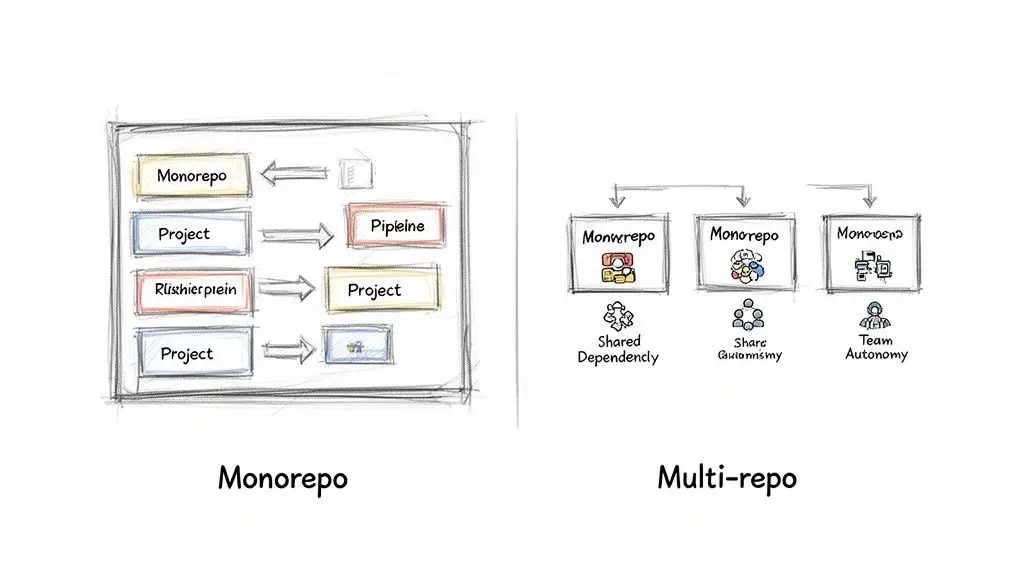
The two dominant architectural patterns are the monorepo and the multi-repo, each presenting distinct trade-offs.
Monorepo: The Centralized Approach
A monorepo consolidates all of an organization’s code into a single repository. All services, applications, and shared libraries coexist.
- Key Advantage: Simplifies cross-cutting changes and dependency management. Changes affecting multiple services can be made in a single atomic commit, ensuring system-wide consistency. There is only one version of any shared library, mitigating “dependency hell.”
- Primary Constraint: Can suffer from performance issues as the repository grows. Without intelligent tooling that builds only what has changed, build times can become prohibitively slow. The sheer scale can also present challenges for both developers and the CI system.
Multi-repo: The Distributed Model
In a multi-repo architecture, each service or application has its own dedicated repository. This model promotes team autonomy, allowing each team to manage its own codebase, dependencies, and release lifecycle.
- Key Advantage: Pipelines are typically faster and more focused, as they are scoped to a single service. Teams can operate independently without interference.
- Primary Constraint: Managing dependencies and coordinating changes across repositories is a significant challenge. Updating a shared library can trigger a cascade of changes across multiple services, requiring complex orchestration and versioning. This operational overhead should not be underestimated.
Industry data confirms the widespread adoption of these practices. Today, 83% of IT decision-makers have implemented DevOps. The tooling market reflects this, with platforms like Atlassian Bitbucket holding an 18.61% market share and CircleCI at 5.72%. Mature teams leveraging pipeline automation free up 33% more time for critical infrastructure work. More DevOps statistics are available at Spacelift.io.
Pipelines-as-Code: A Non-Negotiable Practice
Regardless of the repository structure, one practice is essential: defining your pipeline using Pipelines-as-Code. This involves committing the pipeline definition—typically a YAML file for tools like GitHub Actions or GitLab CI/CD—into the same repository as the application code.
By treating your pipeline configuration as code, you transform it from a fragile, manually configured process into a version-controlled, auditable, and recoverable asset. This is a core principle for building resilient and maintainable software systems.
This approach delivers immediate benefits:
- Version Control: All changes to the pipeline are tracked in Git, providing a complete history.
- Auditability: The pipeline definition is reviewed and approved through the same pull request process used for application code.
- Reproducibility: A new environment can be provisioned or recovered instantly, as the pipeline definition is stored in source control.
The choice between a monorepo and a multi-repo is a strategic decision based on organizational trade-offs. However, adopting Pipelines-as-Code is a tactical necessity for any team building a robust delivery process.
Embedding Security and Observability into Your Pipeline
A basic pipeline automates delivery, but a modern CI/CD pipeline builds trust and resilience into the software lifecycle. The goal is not merely to ship code faster, but to ship it securely and with a clear understanding of its behavior in production. This requires integrating the principles of DevSecOps and observability directly into the pipeline, making them intrinsic properties of the delivery process, not afterthoughts.
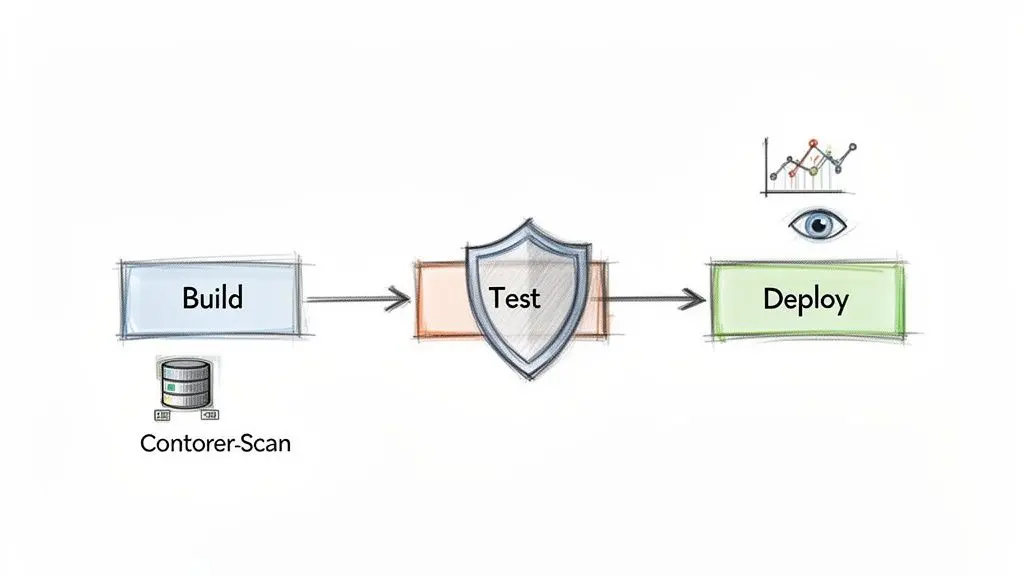
This “shift-left” philosophy involves moving security and quality checks as early as possible in the development cycle. Instead of discovering a critical vulnerability weeks after deployment, the goal is to detect it minutes after a commit. This proactive stance is essential for building secure and maintainable systems.
Shifting Left with Integrated Security Scanning
Automated security tooling embedded within the pipeline is the most effective way to enforce security policy. This is not about creating bureaucratic gates but about providing developers with immediate, actionable feedback. Manual security audits are too slow and expensive to be the primary line of defense.
A robust DevSecOps pipeline includes several layers of automated scanning:
- Static Application Security Testing (SAST): Scans source code for known vulnerabilities (e.g., SQL injection, insecure error handling) before compilation.
- Dependency Scanning: Checks all third-party libraries against databases of known vulnerabilities (CVEs), flagging any package that introduces risk.
- Container Analysis: Scans Docker container images for vulnerabilities in the base OS or installed packages and for security misconfigurations.
By embedding these checks, you establish a security baseline against which every commit is evaluated. This is not just a technical best practice; it is a critical risk management strategy. You can start by identifying potential weak spots with our free AI Risk & Privacy Checklist.
Treating Your Pipeline as a Product
A CI/CD pipeline is an internal product whose customers are your engineering teams. Like any product, it requires maintenance, monitoring, and continuous improvement. This requires building observability into the pipeline itself.
A pipeline without metrics is a black box. You cannot improve what you do not measure. The objective is to gather actionable data that helps you identify bottlenecks and increase developer productivity.
Key metrics to track include:
- Build Duration: How long does a pipeline run take from commit to completion? Spikes may indicate inefficient tests or resource constraints.
- Failure Rate: What percentage of pipeline runs fail? A high failure rate often indicates “flaky” tests that erode developer trust in the automation.
- Time to Recovery: When a pipeline breaks, how long does it take to restore it to a functional state? This metric reflects the maintainability of your system.
Analysis of these metrics helps identify friction points. Data shows that mature organizations often use multiple CI/CD tools (32% use two, 9% use three or more), with GitHub Actions leading at 33% adoption and Azure DevOps at 24%. This reflects a strategy of selecting best-in-class tools for specific needs like security and observability. The ROI is significant, with 44% of leaders reporting a 5x return and saving over $2.5 million in three years by catching issues earlier. More CI/CD statistics can be found on Integrate.io.
This product mindset—continuously refining the pipeline based on data—is what distinguishes a simple automation script from a strategic asset that multiplies engineering effectiveness.
Avoiding Common Pitfalls and Pipeline Anti-Patterns
Implementing a CI/CD pipeline is a significant architectural improvement, but automation alone does not guarantee success. Without careful design and maintenance, a new toolchain can become a source of friction and failure. These issues, or anti-patterns, typically arise not from technical limitations but from neglecting the pipeline as a living system that requires continuous improvement.
The Flaky Pipeline
A “flaky pipeline” is one that fails for non-deterministic reasons unrelated to the code change, such as network timeouts, transient environment issues, or poorly written tests. This is highly corrosive to team morale.
When developers can no longer trust a red build to indicate a real problem, they begin to ignore all build failures. The automation becomes noise, and its value is lost. The standard must be 100% reliability: the pipeline fails only when there is a genuine issue to be addressed. This requires aggressively identifying and quarantining non-deterministic tests.
Slow Feedback Cycles
A pipeline that takes an hour to provide feedback is a major productivity killer. Long build and test cycles force developers into context switching, disrupting their workflow and slowing team momentum. Furthermore, long feedback loops increase the likelihood of conflicting changes accumulating in the main branch, complicating integration.
Relentless optimization is necessary:
- Parallelize Test Execution: Run independent test suites concurrently to reduce total runtime.
- Optimize Build Caching: Configure the build process to reuse previously compiled artifacts and dependencies.
- Fail Fast: Structure the pipeline to run the fastest tests (e.g., linters, unit tests) first to provide immediate feedback on simple errors.
The Deployment Bottleneck
This anti-pattern is often cultural rather than technical. It occurs when automation is implemented up to the point of deployment, but the final release to production is blocked by manual approval gates, change advisory board meetings, or a culture of fear surrounding releases.
A pipeline is only as fast as its most restrictive gate. If automation ends at a manual approval board, you have achieved continuous integration but are still far from continuous delivery.
The solution involves building trust in the automation. Implement progressive rollouts like canary releases, invest in robust observability to monitor real-time performance, and empower teams with the autonomy to deploy their own services. This is a core aspect of continuous improvement, a topic we explore in our guide on how Kaizen projects maintain existing systems.
Inadequate Secrets Management
Hardcoding secrets—API keys, database credentials, certificates—directly into pipeline scripts or source control is a severe security vulnerability. It exposes critical credentials to anyone with access to the repository or build logs.
This is non-negotiable: a pipeline must integrate with a dedicated secrets management tool like HashiCorp Vault, AWS Secrets Manager, or Azure Key Vault. Credentials should be injected dynamically into the build environment at runtime and must never be stored in plain text.
CI CD Pipeline Anti-Patterns and Mitigation Strategies
| Anti-Pattern | Negative Impact | Recommended Mitigation Strategy |
|---|---|---|
| The Flaky Pipeline | Developers lose trust in build results and start ignoring failures, rendering the pipeline useless. | Aggressively identify and quarantine non-deterministic tests. Strive for a 100% reliable build. |
| Slow Feedback Cycles | Developers switch contexts, productivity drops, and integration becomes more complex and risky. | Parallelise tests, optimise caching, and structure the pipeline to “fail fast” by running quick tests first. |
| The Deployment Bottleneck | Automation value is lost due to manual gates and a fear-driven culture, preventing true continuous delivery. | Build trust through observability, adopt progressive rollouts (e.g., canary releases), and empower teams. |
| Inadequate Secrets Management | Exposes sensitive credentials in code or logs, creating a major security vulnerability. | Integrate with a dedicated secrets manager to inject credentials dynamically at runtime. Never hardcode secrets. |
Avoiding these pitfalls requires treating the pipeline not just as a technical tool, but as a critical process that demands discipline, maintenance, and continuous refinement.
Essential Principles for a Successful CI/CD Implementation
A successful CI/CD implementation is more than a technical exercise; it is a strategic initiative that requires a shift in engineering culture and practices. Adhering to a few core principles ensures that the pipeline delivers tangible business value rather than becoming another layer of complexity.
Start with the Problem, Not the Tool
Before evaluating CI/CD tools, clearly define the problem you are solving. Is the primary issue slow release cycles? High rates of production failures? Inefficient developer workflows? A well-defined problem statement ensures that your pipeline ci cd strategy is focused on addressing specific business constraints, preventing the adoption of technology for its own sake.
Treat Your Pipeline as a Product
Your pipeline is an internal product, and your engineers are its customers. It requires clear ownership, a maintenance roadmap, and continuous refinement based on user feedback. Measure its performance, identify bottlenecks, and invest engineering time in making it faster, more reliable, and easier to use.
A pipeline that developers don’t trust is worse than no pipeline at all. It must be reliable, efficient, and actively maintained to add value. Otherwise, it just becomes another source of frustration.
Embed Security from Day One
Security cannot be an afterthought. It must be an automated, integral part of the pipeline from the first commit. Integrate tools for static analysis (SAST), software composition analysis (SCA) for dependencies, and container scanning directly into the workflow. This “shift-left” approach provides developers with immediate security feedback and fosters a culture of shared security responsibility.
Foster a Culture of Iteration and Trust
A pipeline’s effectiveness is ultimately determined by organizational culture. Automation must be paired with psychological safety, empowering teams to deploy small, frequent changes without fear of blame. This requires implementing blameless post-mortems and fostering a sense of shared operational ownership. This principle is a cornerstone of a healthy engineering culture, which we detail in our guide to creating a code of conduct for engineering and AI teams.
Frequently Asked Questions
Here are practical answers to common questions that arise when planning or refining a pipeline ci cd strategy, designed to guide technical leaders.
How Do We Choose the Right CI/CD Tools?
The “best” tool is the one that best fits your technical ecosystem, team expertise, and scalability requirements. The objective is to reduce friction for developers, not to adopt the latest trend.
Consider these factors:
- Ecosystem Integration: If your organization uses GitHub, GitHub Actions provides seamless integration. For those seeking an all-in-one platform, GitLab combines source control, CI/CD, and registries.
- Customization vs. Maintenance: For complex, bespoke workflows, Jenkins offers extensive customization but comes with a higher maintenance overhead.
- Cloud Provider Alignment: Major cloud providers—AWS, Azure, and GCP—offer mature, native CI/CD services that integrate tightly with their respective infrastructure offerings.
Select tooling that aligns with and enhances your existing workflows.
What Is the Difference Between Continuous Delivery and Continuous Deployment?
These terms describe two distinct levels of automation in the release process. The distinction is critical for setting clear strategic goals for your pipeline.
- Continuous Delivery ensures that every change passing all automated tests is automatically released to a staging-like environment. However, the final deployment to production requires manual approval. This model provides control over the precise timing of releases.
- Continuous Deployment is the full automation of the entire release process. Every change that passes all automated tests is automatically deployed to production without human intervention. This requires an extremely high level of confidence in your testing, monitoring, and automated rollback capabilities.
How Can We Measure the ROI of a CI/CD Pipeline?
The return on investment (ROI) of a CI/CD pipeline is measured through metrics that reflect tangible improvements in delivery performance, quality, and engineering efficiency. The four key DORA metrics are the industry standard for measuring the performance of a software delivery organization:
- Deployment Frequency: How often an organization successfully releases to production.
- Lead Time for Changes: The amount of time it takes a commit to get into production.
- Change Failure Rate: The percentage of deployments causing a failure in production.
- Time to Restore Service (MTTR): How long it takes to recover from a failure in production.
Improvements in these metrics provide a quantitative basis for ROI, which can be supplemented with qualitative data such as developer hours saved from manual tasks and cost avoidance from reduced production incidents.
How Does CI/CD Apply to AI and ML Models?
The principles of a pipeline ci cd are foundational to Machine Learning Operations (MLOps), but they are extended to manage the unique lifecycle of AI/ML models. The goal remains automation and reliability, but the process must handle assets beyond source code, namely data and trained models.
An MLOps pipeline includes standard CI stages but adds new ones:
- Data Validation: Automated checks for the quality, schema, and statistical properties of training data.
- Model Training and Validation: Automated retraining of models and programmatic evaluation against performance benchmarks.
- Model Deployment: Packaging the validated model as a scalable service or API.
- Production Monitoring: Continuous tracking of the model’s real-world performance to detect “concept drift” or data degradation that necessitates retraining.
MLOps adapts the CI/CD paradigm to manage the full lifecycle of data, models, and code as a cohesive system.
At Devisia, we believe a robust CI/CD pipeline is the foundation of any reliable digital product. We partner with companies to build maintainable, scalable software systems with a product mindset that ensures long-term value. Learn how we can help you turn your vision into reality at https://www.devisia.pro.
_Article created using Outrank