
As of March 2024, Google Consent Mode v2 is a non-negotiable requirement for businesses serving users in the European Economic Area (EEA) and the UK. Failure to implement it correctly results in immediate data loss and degraded advertising performance. For founders, CTOs, and product leaders, this is not a legal abstraction but an urgent architectural problem with direct business consequences.
The Problem: Why Inaction Is No Longer an Option
Privacy regulations like the GDPR and the Digital Markets Act (DMA) have fundamentally changed the rules for data collection. The era of assumed consent is over. Ignoring the new landscape creates two immediate, critical failures for any data-driven business.
The core problem is this: your analytics and advertising platforms, particularly those from Google, require a continuous flow of user data to measure performance, build audiences, and optimize spend. Without explicit, signaled consent from users, this data flow is severed for a significant portion of your audience, creating critical visibility gaps.
The Consequences of a Naive Implementation
Treating Consent Mode v2 as a simple marketing or compliance checkbox is a strategic error. A superficial “cookie banner” approach is no longer sufficient and exposes the business to significant risks.
- Data Loss and Performance Degradation: Without a correct Consent Mode v2 implementation, Google blocks new data from your EEA and UK users for advertising and personalization. This means your remarketing audiences stop growing, and campaign targeting becomes progressively less effective.
- Severe Legal and Financial Penalties: The DMA provides regulators with clear authority to impose substantial fines for non-compliance. This is not a theoretical risk but a material financial threat to organizations that fail to adapt their technical architecture.
For a B2B software company, the impact is tangible. Imagine your lead generation campaigns losing the ability to retarget high-intent prospects who visited your pricing page. Or your product team losing visibility into how users from key European markets engage with new features. This is the reality of operating without a proper Consent Mode v2 architecture.
A superficial approach views Consent Mode v2 as a legal hurdle to be cleared with a banner. A pragmatic, architectural approach recognizes it as a necessary system for governing data flows and ensuring business continuity in a privacy-centric world. It is a foundational technical decision, not a last-minute compliance task.
This shift has made a robust implementation a core business and technical necessity.
The Solution: A New Consent Signaling Architecture
Consent Mode v2 is not a minor update; it introduces a new architectural pattern for handling user consent signals. The fundamental change lies in decoupling data storage from data usage.
The original Consent Mode introduced two parameters: analytics_storage and ad_storage. These control whether Google tags can read or write cookies for analytics and advertising purposes. If a user denies consent, the cookie is not stored. These parameters remain in v2.
The New Signals Governing Data Processing
Consent Mode v2 adds two new, more critical parameters that govern how data is processed and used by Google’s services, even if collected without cookies.
ad_user_data: This parameter controls whether user data can be sent to Google for advertising purposes. If a user deniesad_user_data, any user identifiers are stripped from the data before transmission, even ifad_storagewas granted.ad_personalization: This parameter specifically governs remarketing and personalized advertising. When a user deniesad_personalization, you are instructing Google not to use their data to build or target advertising audiences.
This granular control aligns tag behavior more closely with the GDPR principles of purpose limitation and data minimization. It allows a user to consent to aggregate ad measurement (ad_storage) while rejecting personalized tracking (ad_personalization).
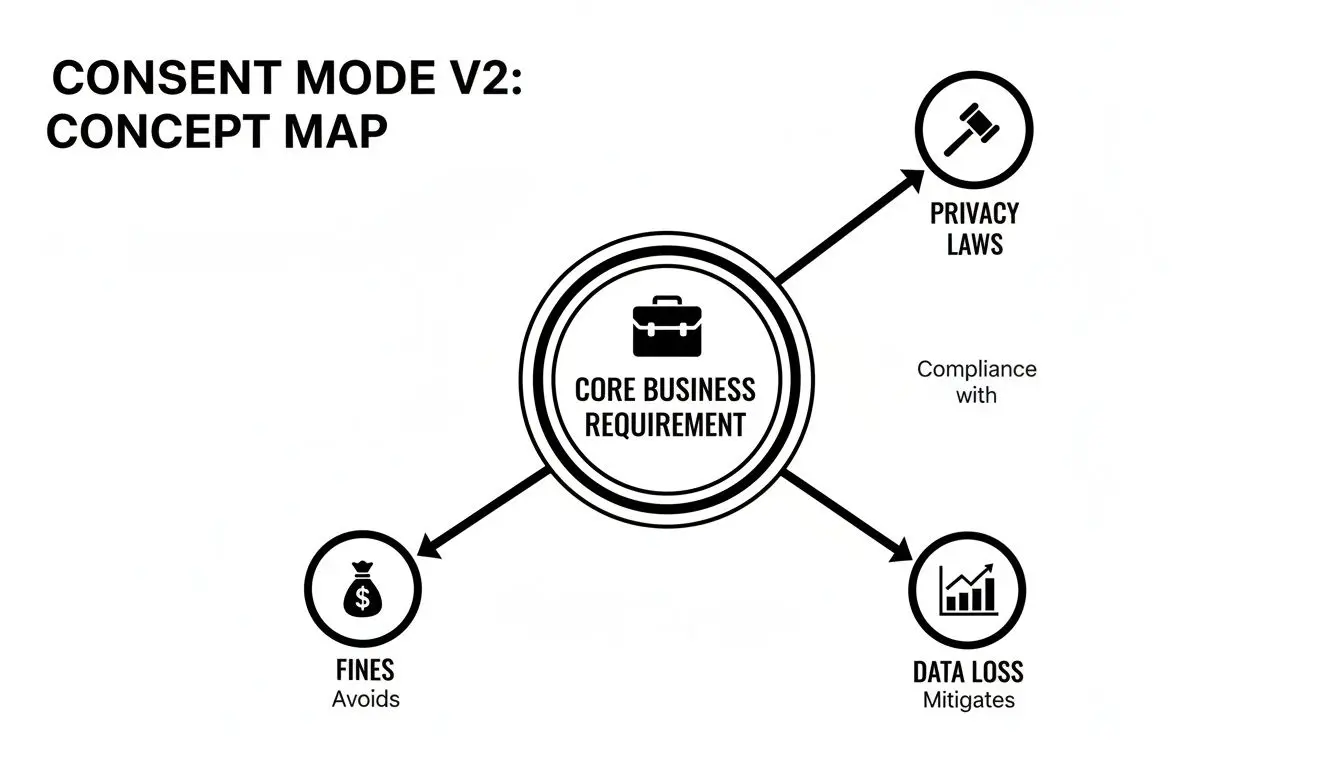
The new architecture connects legal requirements directly to technical implementation, making compliance a function of system design rather than manual oversight.
Consent Mode v1 vs. v2 Signal Comparison
| Signal | Consent Mode v1 | Consent Mode v2 | Primary Function |
|---|---|---|---|
analytics_storage | ✓ | ✓ | Controls storage for analytics cookies. |
ad_storage | ✓ | ✓ | Controls storage for advertising cookies. |
ad_user_data | ✓ | Governs sending user data to Google for advertising. | |
ad_personalization | ✓ | Governs personalised advertising and remarketing. |
The addition of the two new signals fundamentally changes how consent is managed, moving from a simple storage-based model to a more sophisticated usage-based one.
Tracing the Signal Flow: An Architectural Pattern
The implementation follows a clear, predictable pattern:
- User Interaction: A user visits the site and is presented with a Consent Management Platform (CMP) banner. They make a choice (e.g., “Accept All,” “Reject All,” or a custom selection).
- Signal Transmission: The CMP translates this choice into the four consent signals (
grantedordenied) and communicates them to the Google tag (gtag.js) on the page. - Behavioral Adjustment: The Google tag adjusts its behavior in real time based on the received signals. If
ad_personalizationisdenied, remarketing capabilities are disabled for that user immediately.
This automated, programmatic approach minimizes the risk of human error in tag configurations. It also underscores why a deep understanding of explicit opt-in vs opt-out models is critical for a compliant implementation.
Implementation Trade-Offs: Basic vs. Advanced Mode
The first architectural decision in a Consent Mode v2 implementation is the choice between “Basic” and “Advanced” mode. This is not merely a technical toggle but a strategic decision with significant trade-offs between absolute privacy and the practical need for data modeling.
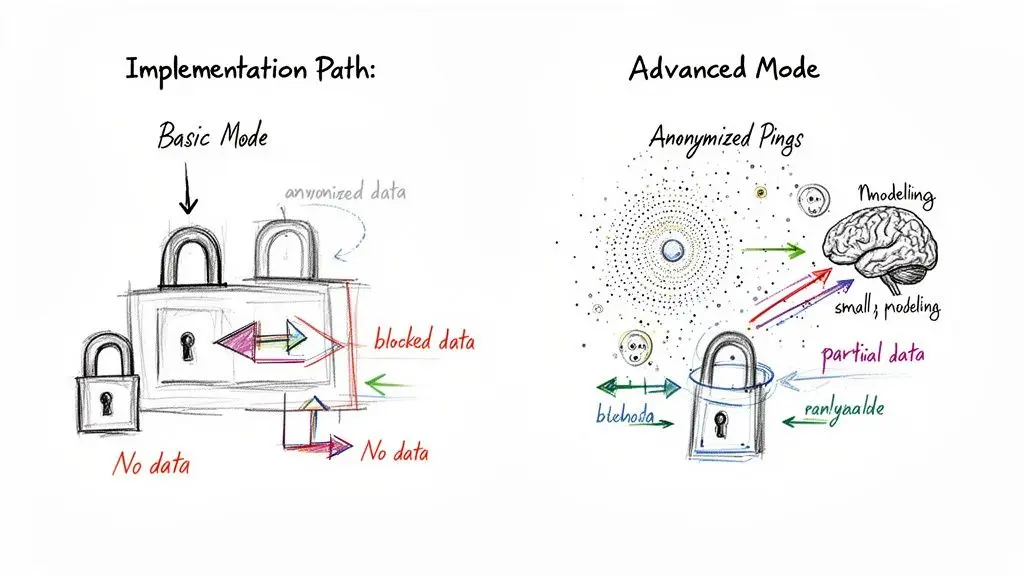
Basic Implementation: The Hard Gate
Basic mode operates as a simple on/off switch. If a user denies consent, all Google tags are blocked from firing. No data is sent to Google from that user.
- Architecture: The CMP or tag manager prevents Google tags from loading if consent is not granted.
- Benefit: It is the simplest path to compliance and offers the most stringent privacy for users who opt out. The compliance argument is straightforward.
- Constraint: It creates a complete data black hole for non-consenting users. This provides zero visibility into that segment of traffic, which can severely skew analytics and degrade the performance of machine learning-based advertising models.
For organizations with an extremely strict interpretation of privacy rules or those prioritizing implementation simplicity over data completeness, Basic mode is a valid choice. However, it comes at the cost of significant data loss.
Advanced Implementation: The Nuanced Approach
Advanced mode offers a more sophisticated solution. Instead of blocking tags, it allows them to load but modifies their behavior based on the user’s consent status. If a user denies consent, the tags send cookieless, anonymized signals (pings) to Google.
These pings contain no personal identifiers and are used for aggregate statistical modeling to estimate user behavior and conversions that would otherwise be lost.
Important: Advanced mode is not a compliance workaround. It is a specific, privacy-enhancing technology designed for statistical modeling using anonymized signals, not for tracking individual users who have denied consent.
This implementation requires a more careful technical setup. Tags must be configured to load before the consent banner appears, with a default “denied” state. They then listen for the user’s choice and adjust their data collection in real time.
When implemented correctly, Advanced mode enables conversion modeling, which helps maintain the accuracy of performance metrics and the efficacy of automated bidding strategies. You can explore the data on how this impacts revenue and ad performance to understand the business case.
Key Architectural Trade-Offs
| Factor | Basic Implementation | Advanced Implementation |
|---|---|---|
| Data from Non-Consenting Users | Zero. Complete data loss. | Anonymised Pings. Enables modeling. |
| Conversion Modeling | Not possible. Data gaps remain. | Enabled. Recovers lost conversion data. |
| Implementation Complexity | Lower. Simpler logic to block tags. | Higher. Requires default consent states and careful tag sequencing. |
| Compliance Risk | Lowest. Easiest to defend and audit. | Low, but requires validation. Must align with legal interpretation and be implemented correctly. |
The decision between Basic and Advanced mode is an architectural one with long-term consequences. For most data-driven businesses, Advanced mode offers significant advantages but demands a rigorous and well-documented implementation.
The Business Impact of Data Modeling
The choice between a Basic and Advanced implementation has direct financial implications. Advanced mode’s ability to enable conversion modeling is its primary business benefit, helping to mitigate the negative impact of data loss on revenue and return on ad spend (ROAS).
Recovering Lost Conversions with Anonymized Data
When a user denies consent in an Advanced implementation, the cookieless pings sent to Google contain aggregated, non-identifying information, such as device type or the conversion event triggered.
Google’s models use this data to estimate the conversions from the non-consenting user cohort, filling the measurement gaps created by consent denials. This provides a more accurate view of campaign performance, which is critical for making sound budget and product decisions.
The Data Threshold Constraint
This modeling capability is not automatic. It is subject to a data volume threshold, a critical constraint for many businesses.
Advanced Mode can recover a significant portion of lost conversions, but only if the property meets specific data thresholds. A Google Analytics property needs at least 1,000 daily events with
ad_storageoranalytics_storageset to ‘denied’ for a minimum of 7 days, alongside 1,000 daily users sending events with consent. For early-stage companies or products with niche audiences, meeting this threshold is a significant challenge. Failing to meet it means you get no modeling benefit, even with an Advanced setup. More details can be found in this analysis of Consent Mode v2.
This data minimum is a hard constraint. If your site or application does not generate sufficient traffic, you will not unlock conversion modeling.
A Real-World Scenario for a B2B SaaS
Consider a B2B SaaS company running Google Ads to drive demo requests from a European audience where consent rates are low.
- With Basic Mode: You only see conversions from users who consented. Your reported ROAS is artificially low, automated bidding strategies are starved of data, and you might incorrectly conclude that a campaign is unprofitable, leading to poor budget allocation decisions.
- With Advanced Mode (and sufficient traffic): The system models a portion of the conversions from the non-consenting group. Your reported ROAS in Google Ads is more accurate. Smart bidding algorithms have a richer dataset, and your GA4 reports provide a truer picture of performance.
This recovered data provides the stability needed for effective campaign management and data-driven decision-making. Integrating this capability is a key component of building a resilient Data Management Platform that can adapt to the evolving privacy landscape.
A Practical Implementation and Migration Checklist
A successful Consent Mode v2 rollout is a methodical infrastructure project. It requires a precise audit of your current architecture, careful tool selection and integration, and rigorous testing.
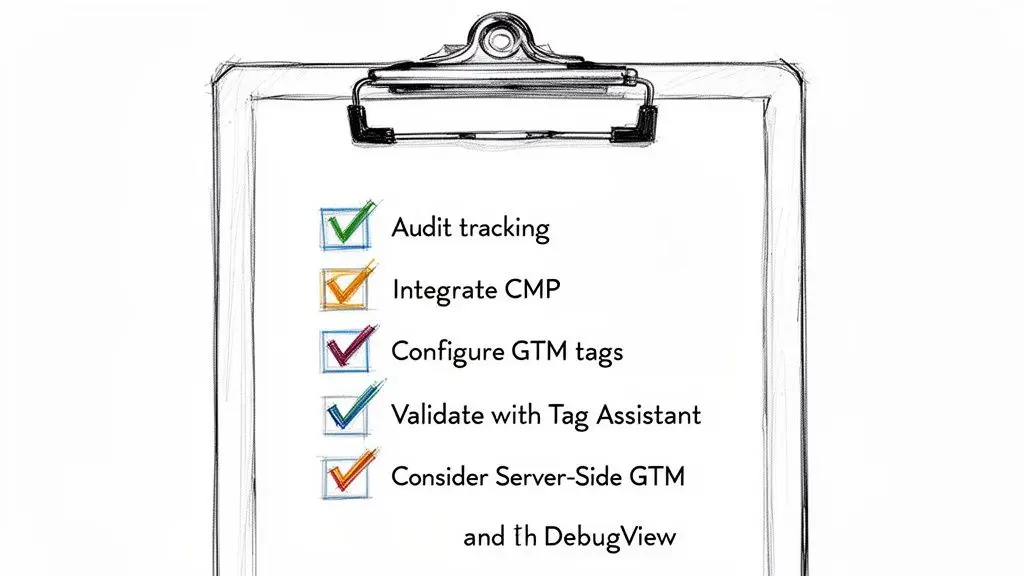
Follow this phased checklist for a robust and compliant implementation.
Phase 1: Audit the Current Technical Framework
Before implementing any changes, you must have a precise map of your existing data collection architecture.
- Map All Tracking Tags: Identify every script on your site or application that collects user data. This includes not only Google tags but also analytics pixels, advertising scripts, session replay tools, and CRM trackers. Document what data they collect and their destination.
- Review Existing Consent Mechanism: Does your current banner meet GDPR standards? Does it block tags before consent (the Basic mode pattern), or does it allow them to load with a default
deniedstate (a prerequisite for Advanced mode)? - Document Data Flows: Trace the path of user data from your digital properties to third-party platforms like Google Analytics and Google Ads. This exercise will reveal the compliance gaps that Consent Mode v2 is designed to address.
Phase 2: Select and Integrate a Certified CMP
Your Consent Management Platform (CMP) is the cornerstone of the implementation. It is the engine that translates user choice into the technical signals required by Google’s tags.
- Mandate Google-Certified CMPs: This is not optional. You must select a CMP from Google’s certified partner list. These platforms are built to communicate with Consent Mode v2, ensuring the new
ad_user_dataandad_personalizationsignals are passed correctly. Using a non-certified solution introduces a high risk of signal errors and non-compliance. - Configure CMP Categories: Map your CMP’s user-facing consent categories (e.g., “Marketing,” “Analytics”) to Google’s four consent signals. For example, if a user unchecks the “Marketing” category, your CMP must be configured to set
ad_storage,ad_user_data, andad_personalizationtodenied. This mapping is a critical point of potential failure.
A common mistake is to assume any cookie banner is sufficient. A certified CMP is an orchestration tool, not just a UI element. It manages the entire consent signaling process, ensuring your technical implementation accurately reflects user intent and regulatory requirements.
Phase 3: Configure Tags and Default States
This phase focuses on the technical implementation within your tag management system. The goal is to ensure no data is collected before the correct consent state has been declared. This is mandatory for a compliant Advanced Mode implementation.
-
Set Default Consent States: Before any Google tags fire, you must set a default consent state for all four parameters to
denied. This command instructs the tags to assume no consent has been granted until explicitly told otherwise by the user.// Set default consent to 'denied' before any tags fire gtag('consent', 'default', { 'ad_storage': 'denied', 'analytics_storage': 'denied', 'ad_user_data': 'denied', 'ad_personalization': 'denied' }); -
Fire Tags Unconditionally (Advanced Mode): In an Advanced setup, configure your Google Tag Manager triggers to fire Google tags on page load, regardless of consent. The tags will self-regulate based on the default
deniedstate. -
Update Consent on User Interaction: The CMP listens for the user’s choice and, upon interaction, fires a consent
updatecommand, changing the states fromdeniedtograntedas appropriate.
Phase 4: Validate and Monitor the Implementation
Rigorous, scenario-based testing is non-negotiable. You must verify that the configuration behaves as expected in every possible consent state.
- Use Google Tag Assistant: In preview mode, use the “Consent” tab to verify the “On-Page Default” state is
deniedfor all parameters. Then, interact with the consent banner and observe the “On-Page Update” to confirm that states change correctly. - Inspect GA4’s DebugView: After granting consent, examine the network requests in DebugView. Look for the
gcsparameter attached to events (e.g.,gcs=G111). This parameter provides a machine-readable confirmation of the consent status being sent with each hit. A status likeG100would indicate consent for advertising was denied, as expected.
Following these steps ensures you build an architecturally sound system that is both compliant and provides a reliable foundation for your data strategy.
Long-Term Governance and Compliance Risks
Implementing Consent Mode v2 is not a one-time project; it is the start of an ongoing governance commitment. Treating it as a “set and forget” task exposes the organization to significant legal and financial risk.
The 2024 mandate has increased the legal stakes, particularly for European companies. Fines under GDPR can be severe, and the specifics of the Consent Mode v2 mandate indicate that enforcement will become more rigorous.
Aligning Technical Implementation with Legal Policy
A common point of failure is a disconnect between the company’s public-facing privacy policy and its technical implementation. A privacy policy is a legally binding document. If it states that you will not use data for advertising without consent, your Consent Mode v2 configuration must enforce that rule without exception.
The greatest compliance risk is not a technical bug, but a mismatch between what your legal documents promise and what your systems actually do. Audits are designed to find precisely this gap.
Managing this risk requires proactive governance:
- Document Everything: Maintain detailed records of your consent logic, including the mapping of CMP categories to Google’s signals and the rationale for choosing a Basic or Advanced implementation.
- Conduct Regular Audits: Schedule periodic internal audits to re-validate your configuration using tools like Google Tag Assistant. Verify that tags fire (or are blocked) as expected and that no new, unmanaged scripts have been added.
- Version Control for Policies and Configurations: Your privacy policy and consent configuration must be managed in lockstep. A change in one must trigger a review and potential update of the other.
Building a Sustainable First-Party Data Strategy
Consent Mode v2 is an integral part of the broader architectural shift toward a first-party, privacy-first data strategy. The long-term competitive advantage will belong to businesses that build systems based on user trust and transparency.
This requires embracing a “privacy by design” philosophy. Strong data governance, supported by a clear Data Processing Agreement, forms the foundation of this strategy. By building systems that respect user choice, you are not just meeting a legal requirement; you are building a more resilient and valuable business.
Frequently Asked Questions About Consent Mode V2
Here are answers to common technical and strategic questions about Consent Mode v2.
Do I need Consent Mode v2 if I do not use Google Ads?
Yes. If you use Google Analytics and have visitors from the EEA or UK, Consent Mode v2 is essential for data integrity.
Without it, you will lose data for all users who decline consent, even for basic analytics. This means session counts, user behavior insights, and engagement metrics within GA4 will be incomplete. Your ability to understand product usage will be severely compromised.
Can I implement Consent Mode v2 without a CMP?
While technically possible to build a custom consent solution, this is strongly discouraged. It introduces significant technical debt and legal risk.
Google-certified Consent Management Platforms (CMPs) are engineered to integrate with Consent Mode v2 and support frameworks like the IAB’s TCF v2.2. They ensure signals are passed correctly and reliably.
A custom-built consent handler may appear to save on subscription costs, but the potential cost of a misconfiguration—in both data loss and legal penalties—is orders of magnitude higher. A certified CMP is a risk mitigation tool.
How do I verify my implementation is working correctly?
Use Google Tag Assistant to observe the consent state of your tags in real-time. Load your site in preview mode and navigate to the “Consent” tab. Here, you can verify the default state and how it updates after user interaction with your CMP.
In GA4, use the DebugView to inspect individual events. Look for the gcs parameter attached to network requests. This parameter confirms the consent status sent with each hit (e.g., G111 indicates all consent was granted), providing definitive proof that your setup is functioning as designed.
Building robust, privacy-first software is an architectural choice. Devisia helps companies translate complex requirements like Consent Mode v2 into reliable, maintainable systems that deliver measurable business value. Learn more at https://www.devisia.pro.